The Goal
I wanted to build a personal About page completely from scratch — no template, no page builder, just HTML, CSS, and Tailwind. The idea was simple: prove I can take a design concept and turn it into a real, responsive, polished page by hand.
Once the standalone version was done, I took it a step further and ported the whole thing into my Next.js portfolio. That way it's not just a static HTML file sitting in a folder — it actually lives inside a component-based codebase.
Design System
Typography
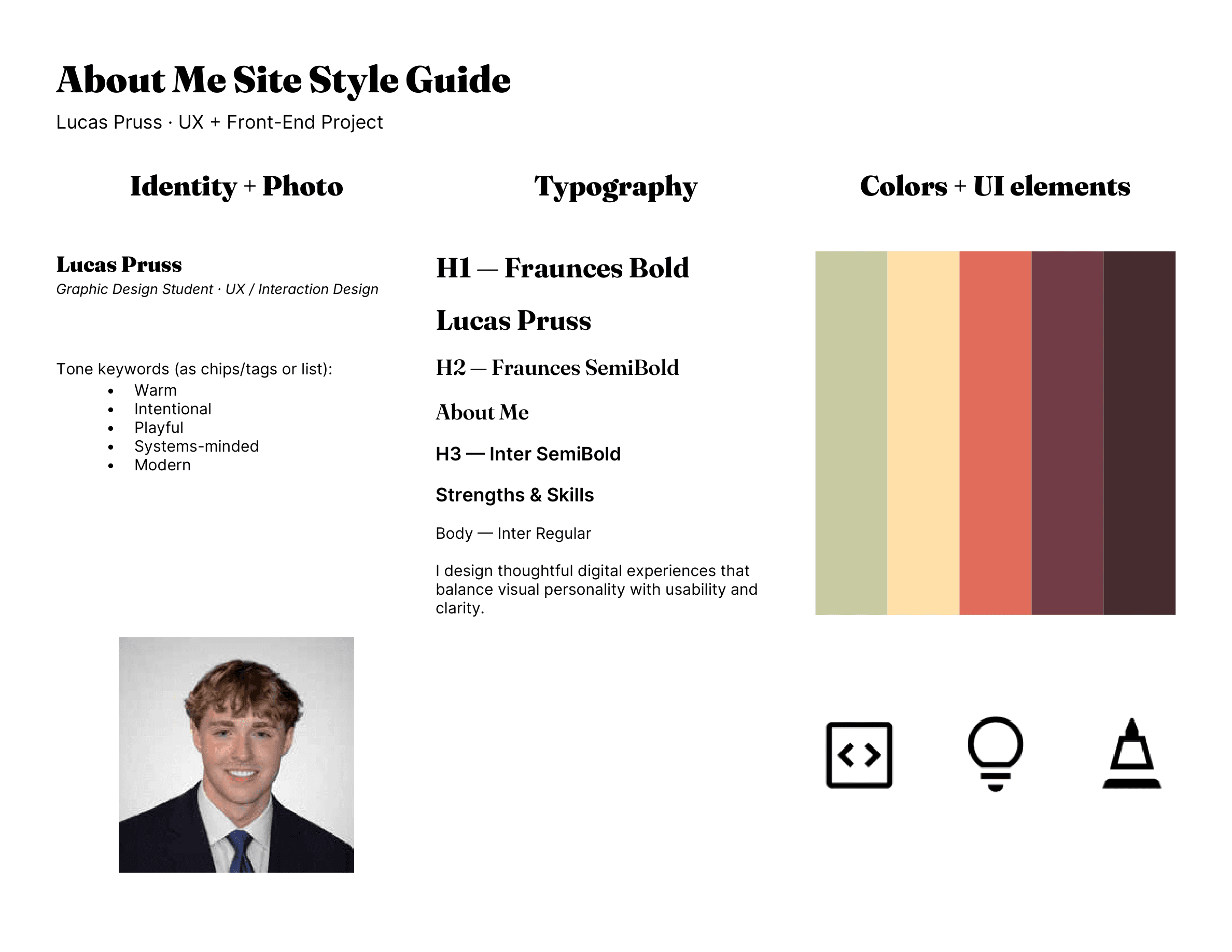
I picked two typefaces that complement each other well. Fraunces is a variable optical serif — it's warm and expressive, so I used it for the big display headings and the hero composition. Inter handles everything else: body text, labels, and UI elements. It's clean and readable at any size.
For sizing, I used clamp() everywhere so the type scales smoothly between mobile and desktop. No hard breakpoint jumps — the hierarchy holds at every screen width.
Color Palette
The palette is warm and personal but still professional. I gave each color a specific job so things stay consistent.
Dry Sage
#C9CBA3
Muted accent for secondary surfaces and subtle highlights.
Soft Peach
#FFE1A8
Primary background. Warm, approachable, high readability.
Vibrant Coral
#E26D5C
Display accent for hero typography and emphasis moments.
Wine Plum
#723D46
Primary text and heading color. Warm contrast against peach.
Mauve Shadow
#472D30
Deep text and footer tones. Anchors the visual weight.
Layout Architecture
Content sits on a 12-column grid on desktop and collapses to a single column on mobile. Every section uses max-w-6xl with consistent padding. Cards get rounded-3xl with light ring borders — enough depth to separate them without heavy drop shadows.
Process
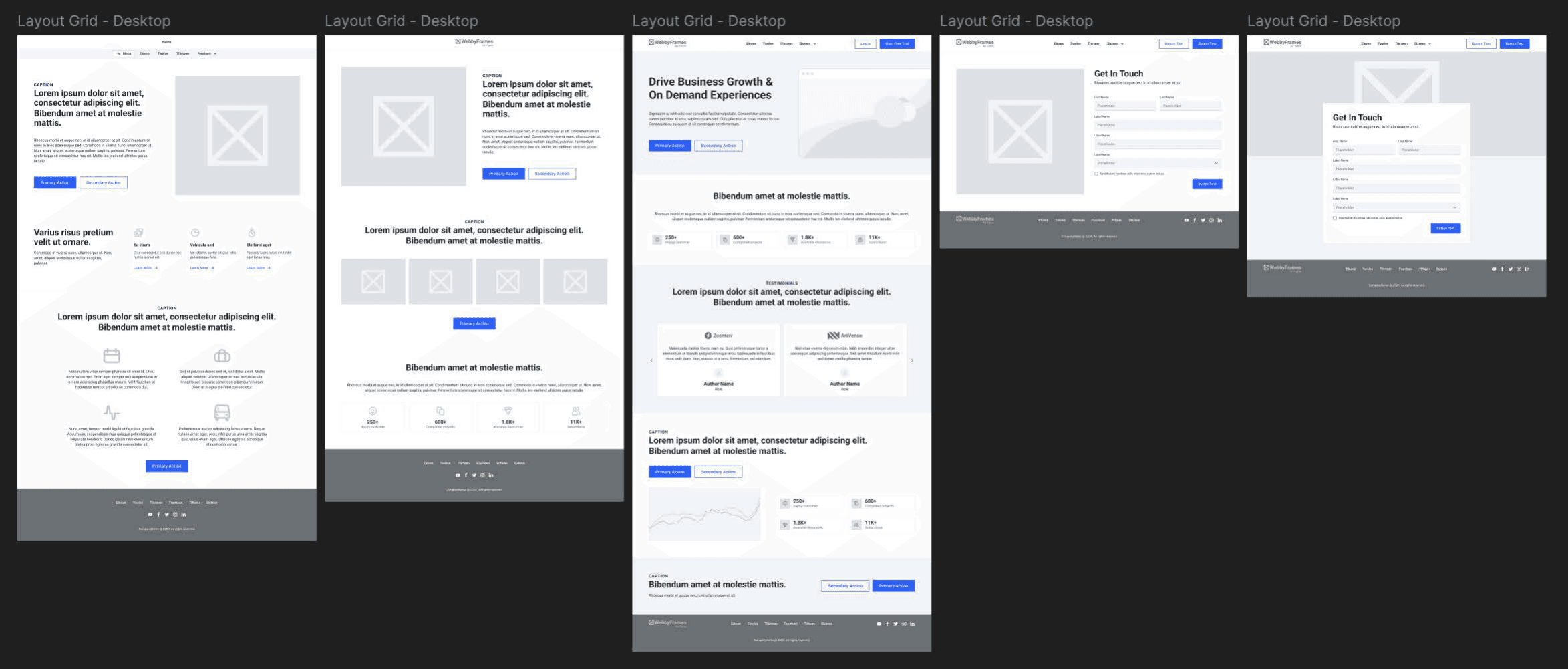
Lo-Fi Wireframe
Before touching any code, I sketched out low-fidelity wireframes to nail down the page structure. This phase was about getting the information architecture right: where the hero goes, how the about/skills grid works, the snapshot carousel flow, and the contact CTA placement.
Style Guide
Once the structure was locked, I put together a style guide to formalize the visual direction before writing any code. It covers:
- Typography — Fraunces Bold for H1s, Fraunces SemiBold for H2s, Inter SemiBold for H3s, Inter Regular for body. The serif/sans pairing gives it warmth without losing clarity.
- Color system — five named tokens (Dry Sage, Soft Peach, Vibrant Coral, Wine Plum, Mauve Shadow), each assigned to a specific role in the UI.
- Tone keywords — Warm, Intentional, Playful, Systems-minded, Modern. These shaped everything from border radii to spacing rhythm.
- UI elements — icon style, card treatments, and component patterns, all documented so design-to-code decisions stay consistent.
This became the single reference I checked against while building.
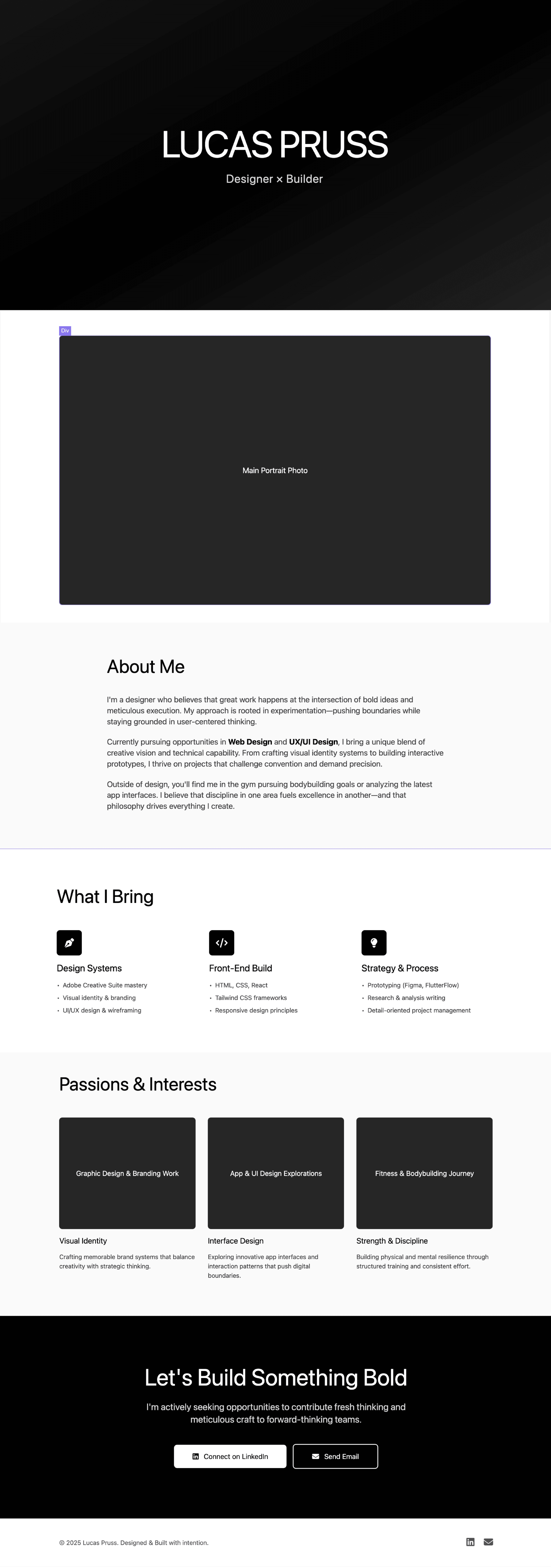
Hi-Fi Wireframe
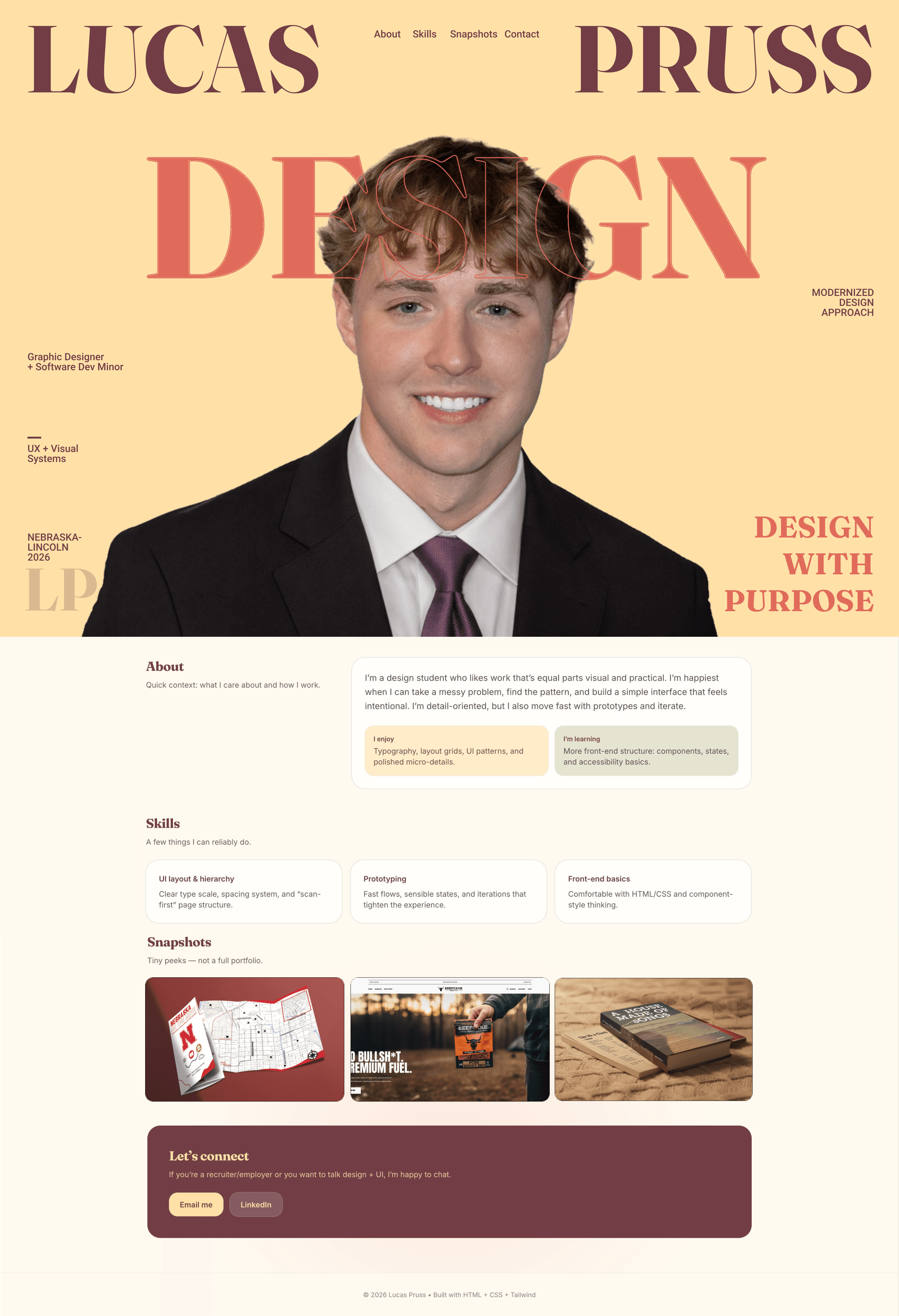
The high-fidelity wireframe took everything from the lo-fi structure and style guide and resolved it into a pixel-level design comp. Every section, spacing value, and visual treatment was finalized here — before I wrote a single line of code.
The Build
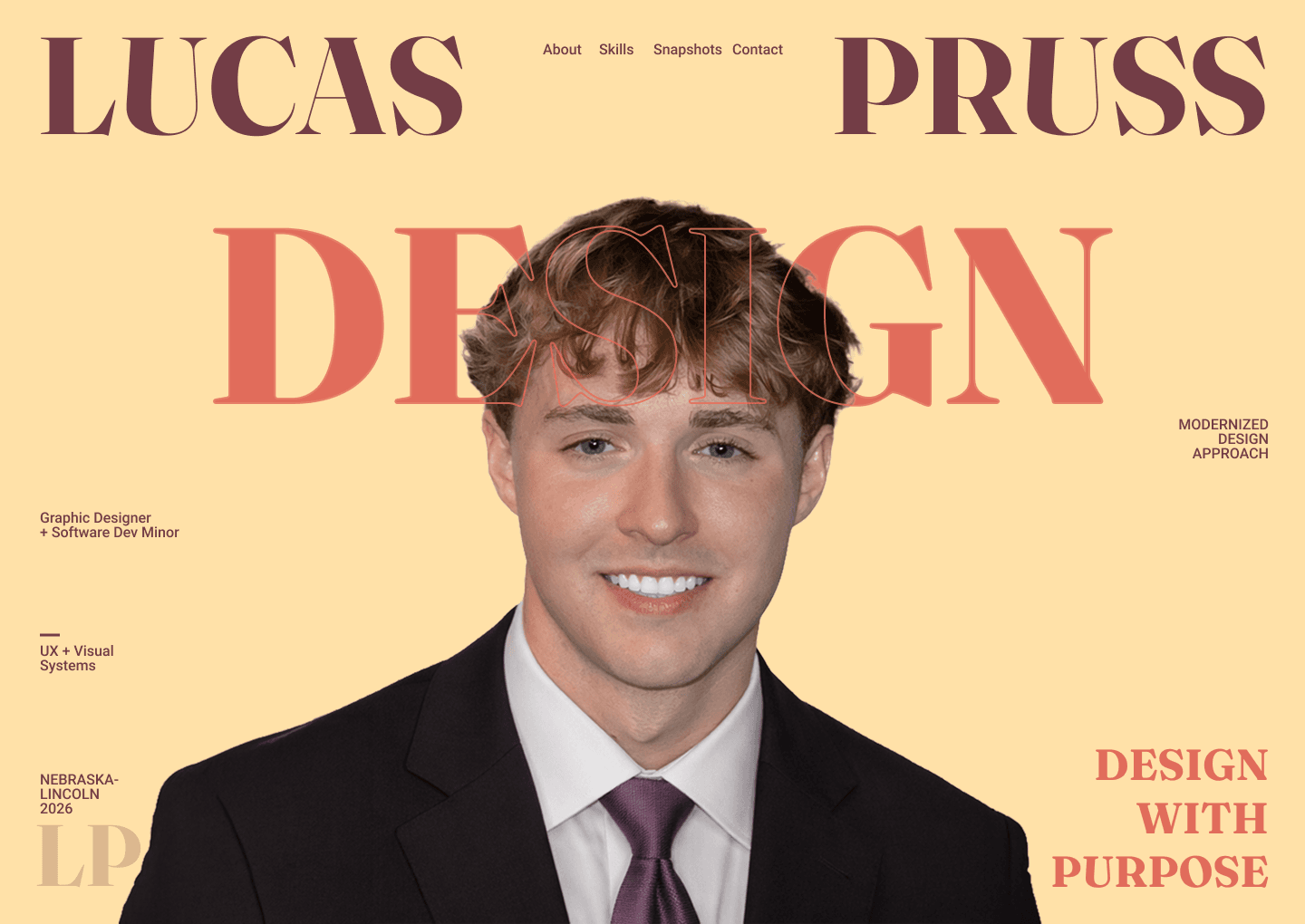
Hero Composition
The hero is a seven-layer CSS composition. No JavaScript involved — it's all absolute positioning and z-index stacking:
- Background — solid
soft-peachwithisolation: isolatefor blend-mode containment - Display word (back) — "DESIGN" in Fraunces at
clamp(96px, 17vw, 220px), vibrant-coral - Portrait — transparent PNG,
object-contain, scaled and offset withtransform - Display word (front) — outlined stroke version using
-webkit-text-stroke, layered over the portrait - Name — "LUCAS / PRUSS" split across the top with
justify-between - Scattered labels — discipline, skills, and location metadata positioned editorially
- Scroll cue — animated downward arrow with a
@keyframesbounce
The whole thing runs on pure CSS: positioning, transforms, clamp-based sizing, and blend modes.
Responsive Engineering
Four breakpoints restructure the layout:
- Desktop (1024px+): Full hero composition with spread name, editorial label placement, wide content grids
- Tablet (768–1024px): Tightened hero proportions, adjusted labels, grid structure preserved
- Mobile (≤767px): Stacked name, centered content, repositioned caption and labels, single-column layouts
- Small mobile (≤430px): Further type scaling, tighter spacing, simplified label hierarchy
Every section adapts — the hero rearranges its entire composition, grids collapse, and typography reflows. All sizing uses clamp() so transitions between breakpoints feel smooth.
Interactions
- Scroll-reveal animations —
IntersectionObservertriggers opacity + transform + blur transitions with configurable direction and stagger delays - Sticky header — transparent over the hero, switches to a frosted-glass solid (
backdrop-filter: blur(12px)) after scrolling past 60% of hero height - Carousel — vanilla JS horizontal scroller with prev/next buttons, keyboard navigation, and drag-scroll detection
- Lightbox — modal image viewer with backdrop click, Escape key dismiss, and focus management
All vanilla JavaScript. No libraries. Each interaction pattern was hand-coded.
Accessibility
- Semantic
<section>,<header>,<main>,<footer>,<nav>,<figure>elements throughout - Decorative layers marked
aria-hidden="true"(hero word overlays, initials, scroll cue) - Interactive elements carry
aria-labelattributes (carousel buttons, lightbox controls, email link) - Lightbox uses
role="dialog"andaria-modal="true"with focus trapping - Carousel controls include
disabledstate management scroll-margin-topoffsets for fixed-header anchor navigation
Integration
I ported the standalone HTML page into Next.js as a React component. Here's what changed:
- Font loading — switched from Google Fonts
<link>tags tonext/font/googlefor optimized, self-hosted delivery with zero layout shift - Image handling — moved to
next/imagewith responsivesizesattributes and priority loading for above-fold content - Scroll animations — reimplemented with
framer-motionwhileInView, replacing the vanilla IntersectionObserver - Component architecture — extracted the hero, sections, and cards into a structured single-page component
- Style scoping — kept the warm color palette working alongside the portfolio's dark theme using container-scoped custom properties and explicit color values
The Result
This project started with a straightforward question: can I design and hand-code a polished, responsive page from scratch? The page itself is the answer — a complete front-end build with a thought-out design system, layered CSS composition, fluid responsive behavior, accessible markup, and vanilla JavaScript interactions.
Then it answered a second question: can I take that standalone work and drop it into a real framework? The Next.js port shows the craft holds up inside an actual codebase, not just as a standalone HTML file.
Reflection
The hero's seven-layer composition was the hardest part and the most educational. Coordinating z-index, mix-blend-mode, and fluid typography across four breakpoints forced me to really understand the CSS stacking context and layout model. There's no shortcut — you either get how the cascade works or you don't.